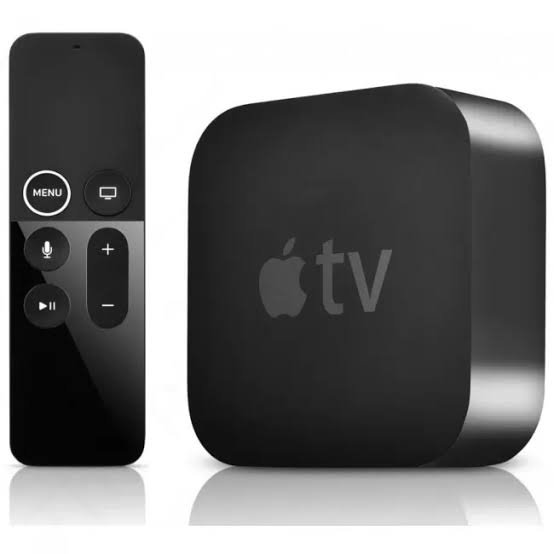
The Apple TV 4K has always been the streaming box people either swear by or never think about. The fourth-generation model, launched in October 2026, makes that divide sharper. It’s faster and better connected, and it also costs a lot more than any Apple TV 4K before it.
So the real question isn’t whether this is a good streaming box. It is. The question is whether it’s $299 good, and for whom.
What Is the Apple TV 4K, and What Changed in 2026?
The Apple TV 4K is Apple’s set-top streaming box. You plug it into your TV over HDMI, and it runs apps like Netflix, Disney+, Apple TV+, and Apple Arcade games, along with Apple’s AirPlay and HomeKit features. It does the same basic job as a Fire TV or Google TV device. It just does it with Apple’s chips, software, and ecosystem, and without ads in the home screen.
The 2026 model is the first major hardware refresh since 2022. Here’s what’s different.
A much faster chip. The new box uses the A19, the same chip that debuted in the iPhone 17, replacing the 2021-era A15 Bionic. Apple claims up to 50 percent faster CPU performance and up to twice the GPU performance. In daily use, that should mean snappier menus and smoother gaming. The chip also includes a dedicated AV1 decoder, which helps streaming services deliver high-quality video using less bandwidth.
More memory and storage. It has 8 GB of RAM and 128 GB of storage, both double the previous base model. There’s one configuration now, so you no longer choose between storage sizes.
Hands-free Siri. A three-microphone array built into the box lets you say “Hey Siri” without picking up the remote. That’s exclusive to this model. The new Siri’s smarter abilities are not: Apple says the upgraded Siri AI is also coming to second- and third-generation models. You probably won’t get the same speed on older hardware, but you won’t be locked out.
Better wireless and wired networking. The box moves up to Wi-Fi 7 and Bluetooth 6, and Thread support, once limited to the pricier model, is now standard. Gigabit Ethernet is included on every unit. The old split between a cheaper Wi-Fi-only box and a more expensive Ethernet box is gone.
A remote you can find. The Siri Remote now supports Find My with Precision Finding and has a built-in speaker that can play a sound. If you’ve ever dug through couch cushions at 11 p.m., you’ll appreciate this. The new remote sells separately for $59 and works with older Apple TV 4K models, so you can get the best part of the upgrade without buying the box.
Four-speaker HomePod surround. The Apple TV 4K can drive a four-speaker setup using HomePod 2 or HomePod mini 2 units, in matching pairs. The previous box could only pair with two.
The Price Problem
The new model costs $299 in the U.S. For context, the third-generation base model started at $129 in 2022. Its last configurations were priced at $199 and $249 after an earlier price increase. Reviewers have noted that the newer box costs more than double what the base third-generation model launched at.
Part of that is real hardware: more RAM, more storage, a newer chip, built-in Ethernet. Part of it is inflation. But a streaming box is a discretionary purchase, and Apple is asking a premium over every competitor that plugs into the same HDMI port.
There’s also a supply wrinkle. What Hi-Fi? reports that the previous model has been discontinued, so unless you buy secondhand, you’ll struggle to find the 2022 box new. The cheaper option is largely gone from shelves.
Who Should Buy It
The new Apple TV 4K makes sense if you:
- Live in the Apple ecosystem. AirPlay, iCloud, Apple Music, Fitness+, and Home integration all work most smoothly here.
- Own, or plan to buy, HomePods. The four-speaker surround feature is the biggest reason to choose this model over a generic streamer.
- Care about a smooth, ad-light interface. The home screen is cleaner than most rivals.
- Want a smart home hub. Apple is positioning the box as a hub for other smart devices, including a new line of home gear.
- Game casually on your TV. The GPU jump matters more here than in streaming.
Who Should Skip It
Be honest with yourself about your viewing habits. You can probably save money if you:
- Mostly watch a handful of streaming apps. A cheaper stick will do the same job. The extra power in the A19 is mostly future-proofing for streaming.
- Already own a third-generation Apple TV 4K. It’s still fast enough. Since the new Siri is coming to older boxes, and the new remote works with them, you can borrow the best upgrades for far less.
- Have a TV with excellent built-in software. Many recent smart TVs are good enough that a separate box is optional.
Setting It Up Properly
A few choices at setup affect how good the experience feels.
- Use Ethernet if you can. With the wired port included on every unit, there’s no reason not to, especially for 4K streams on a busy home network.
- Don’t hide the box in a closed cabinet. The far-field microphones need to hear you. Reviewers have made the same point: the hands-free Siri feature depends on the box being able to hear you clearly. Use a good HDMI cable. A cheap or old cable is the most common cause of dropouts or missing HDR on a 4K setup.
- Pair HomePods early. If you’re building a surround setup, do it during initial setup so the system can calibrate speaker positions. Apple says the speakers automatically detect their positions in the room to adjust timing and levels.
Common Mistakes
Buying more power than you need. If you only watch Netflix and YouTube, paying $299 for faster silicon is hard to justify.
Assuming new Siri requires new hardware. As noted above, older models are getting it too.
Expecting a cheap upgrade path. The new remote is the budget way to modernize an older setup.
Ignoring your TV. A 4K streaming box can’t fix a TV that doesn’t support the HDR formats you want. Check your display first.
Expert Tips
- If you have a third-generation box and just want the remote’s Find My feature, buy the remote alone.
- If you’re buying your first Apple TV, the lack of a cheaper tier changes the math. Compare it against a mid-priced competitor for your actual apps, not for spec-sheet bragging rights.
- Think of the extra storage as headroom for games and apps, not something most people will fill quickly.
Final Thoughts
The Apple TV 4K remains the most polished streaming box you can buy, and the 2026 model adds real, if mostly incremental, improvements. The chip, the networking, and the hands-free Siri are welcome. The HomePod surround support is the standout for people already invested in Apple audio.
But at $299, it’s a premium product in a market full of capable, cheaper options. Buy it if you want the Apple ecosystem’s polish and plan to use the extras. Skip it, or buy just the new remote, if your current setup already does what you need.
FAQ
Is the new Apple TV 4K worth $299?
It depends on how much of the Apple ecosystem you use. If you want HomePod surround sound, hands-free Siri, and smart home hub features, yes. For plain streaming, cheaper devices do the job.
How much storage does the Apple TV 4K have now?
There’s a single 128 GB configuration, with no higher-storage option.
Does the Apple TV 4K have Ethernet?
Yes. Gigabit Ethernet is now included on every unit.
Will older Apple TV 4K models get the new Siri?
Apple says Siri AI is coming to the second and third generations, though hands-free voice activation needs the new box’s built-in microphones.
Can I use the new remote with my old Apple TV 4K?
Yes. It sells for $59 and works with older Apple TV 4K models.
Can I connect more than two HomePods for surround sound?
Yes, up to four, using HomePod 2 or HomePod mini 2 in matching pairs.
Is the previous Apple TV 4K still available?
It’s been discontinued, so new stock is hard to find outside secondhand listings.
Suggested Image Alt Text
- Fourth-generation Apple TV 4K box beside the redesigned Siri Remote on a living room shelf
- Apple TV 4K home screen showing streaming apps on a 4K television
- Four HomePod speakers arranged around a living room for Apple TV 4K surround sound
- Close-up of the Apple TV 4K Siri Remote with the Find My speaker feature
10 Relevant Tags
Apple TV 4K, Apple TV 4K 2026, streaming devices, A19 chip, Siri AI, HomePod surround sound, Wi-Fi 7, smart home hub, tvOS 27, streaming box buying guide
is ma sa url kthm karo sab
Article ke text mein koi URL likha hua nahi tha. Jo links nazar aa rahe thay wo source citations thin. Neeche poora content un ke baghair hai, copy karne ke liye saaf.
SEO Title: Apple TV 4K (2026): What’s New, What It Costs, and Who Should Buy It
SEO Slug: apple-tv-4k-2026-review-buying-guide
Meta Description: The new Apple TV 4K costs $299 and packs an A19 chip, Wi-Fi 7 and hands-free Siri. Here’s what changed and who should actually buy it.
Apple TV 4K (2026): What’s New, What It Costs, and Who Should Buy It
The Apple TV 4K has always been the streaming box people either swear by or never think about. The fourth-generation model, launched in October 2026, makes that divide sharper. It’s faster and better connected, and it also costs a lot more than any Apple TV 4K before it.
So the real question isn’t whether this is a good streaming box. It is. The question is whether it’s $299 good, and for whom.
What Is the Apple TV 4K, and What Changed in 2026?
The Apple TV 4K is Apple’s set-top streaming box. You plug it into your TV over HDMI, and it runs apps like Netflix, Disney+, Apple TV+, and Apple Arcade games, along with Apple’s AirPlay and HomeKit features. It does the same basic job as a Fire TV or Google TV device. It just does it with Apple’s chips, software, and ecosystem, and without ads in the home screen.
The 2026 model is the first major hardware refresh since 2022. Here’s what’s different.
A much faster chip. The new box uses the A19, the same chip that debuted in the iPhone 17, replacing the 2021-era A15 Bionic. Apple claims up to 50 percent faster CPU performance and up to twice the GPU performance. In daily use, that should mean snappier menus and smoother gaming. The chip also includes a dedicated AV1 decoder, which helps streaming services deliver high-quality video using less bandwidth.
More memory and storage. It has 8 GB of RAM and 128 GB of storage, both double the previous base model. There’s one configuration now, so you no longer choose between storage sizes.
Hands-free Siri. A three-microphone array built into the box lets you say “Hey Siri” without picking up the remote. That’s exclusive to this model. The new Siri’s smarter abilities are not: Apple says the upgraded Siri AI is also coming to second- and third-generation models. You probably won’t get the same speed on older hardware, but you won’t be locked out.
Better wireless and wired networking. The box moves up to Wi-Fi 7 and Bluetooth 6, and Thread support, once limited to the pricier model, is now standard. Gigabit Ethernet is included on every unit. The old split between a cheaper Wi-Fi-only box and a more expensive Ethernet box is gone.
A remote you can find. The Siri Remote now supports Find My with Precision Finding and has a built-in speaker that can play a sound. If you’ve ever dug through couch cushions at 11 p.m., you’ll appreciate this. The new remote sells separately for $59 and works with older Apple TV 4K models, so you can get the best part of the upgrade without buying the box.
Four-speaker HomePod surround. The Apple TV 4K can drive a four-speaker setup using HomePod 2 or HomePod mini 2 units, in matching pairs. The previous box could only pair with two.
The Price Problem
The new model costs $299 in the U.S. For context, the third-generation base model started at $129 in 2022. Its last configurations were priced at $199 and $249 after an earlier price increase. Reviewers have noted that the newer box costs more than double what the base third-generation model launched at.
Part of that is real hardware: more RAM, more storage, a newer chip, built-in Ethernet. Part of it is inflation. But a streaming box is a discretionary purchase, and Apple is asking a premium over every competitor that plugs into the same HDMI port.
There’s also a supply wrinkle. What Hi-Fi? reports that the previous model has been discontinued, so unless you buy secondhand, you’ll struggle to find the 2022 box new. The cheaper option is largely gone from shelves.
Who Should Buy It
The new Apple TV 4K makes sense if you:
- Live in the Apple ecosystem. AirPlay, iCloud, Apple Music, Fitness+, and Home integration all work most smoothly here.
- Own, or plan to buy, HomePods. The four-speaker surround feature is the biggest reason to choose this model over a generic streamer.
- Care about a smooth, ad-light interface. The home screen is cleaner than most rivals.
- Want a smart home hub. Apple is positioning the box as a hub for other smart devices, including a new line of home gear.
- Game casually on your TV. The GPU jump matters more here than in streaming.
Who Should Skip It
Be honest with yourself about your viewing habits. You can probably save money if you:
- Mostly watch a handful of streaming apps. A cheaper stick will do the same job. The extra power in the A19 is mostly future-proofing for streaming.
- Already own a third-generation Apple TV 4K. It’s still fast enough. Since the new Siri is coming to older boxes, and the new remote works with them, you can borrow the best upgrades for far less.
- Have a TV with excellent built-in software. Many recent smart TVs are good enough that a separate box is optional.
Setting It Up Properly
A few choices at setup affect how good the experience feels.
- Use Ethernet if you can. With the wired port included on every unit, there’s no reason not to, especially for 4K streams on a busy home network.
- Don’t hide the box in a closed cabinet. The far-field microphones need to hear you. Reviewers have made the same point: the hands-free Siri feature depends on the box being able to hear you clearly.
- Use a good HDMI cable. A cheap or old cable is the most common cause of dropouts or missing HDR on a 4K setup.
- Pair HomePods early. If you’re building a surround setup, do it during initial setup so the system can calibrate speaker positions. Apple says the speakers automatically detect their positions in the room to adjust timing and levels.
Common Mistakes
Buying more power than you need. If you only watch Netflix and YouTube, paying $299 for faster silicon is hard to justify.
Assuming new Siri requires new hardware. As noted above, older models are getting it too.
Expecting a cheap upgrade path. The new remote is the budget way to modernize an older setup.
Ignoring your TV. A 4K streaming box can’t fix a TV that doesn’t support the HDR formats you want. Check your display first.
Expert Tips
- If you have a third-generation box and just want the remote’s Find My feature, buy the remote alone.
- If you’re buying your first Apple TV, the lack of a cheaper tier changes the math. Compare it against a mid-priced competitor for your actual apps, not for spec-sheet bragging rights.
- Think of the extra storage as headroom for games and apps, not something most people will fill quickly.
Final Thoughts
The Apple TV 4K remains the most polished streaming box you can buy, and the 2026 model adds real, if mostly incremental, improvements. The chip, the networking, and the hands-free Siri are welcome. The HomePod surround support is the standout for people already invested in Apple audio.
But at $299, it’s a premium product in a market full of capable, cheaper options. Buy it if you want the Apple ecosystem’s polish and plan to use the extras. Skip it, or buy just the new remote, if your current setup already does what you need.
FAQ
Is the new Apple TV 4K worth $299?
It depends on how much of the Apple ecosystem you use. If you want HomePod surround sound, hands-free Siri, and smart home hub features, yes. For plain streaming, cheaper devices do the job.
How much storage does the Apple TV 4K have now?
There’s a single 128 GB configuration, with no higher-storage option.
Does the Apple TV 4K have Ethernet?
Yes. Gigabit Ethernet is now included on every unit.
Will older Apple TV 4K models get the new Siri?
Apple says Siri AI is coming to the second and third generations, though hands-free voice activation needs the new box’s built-in microphones.
Can I use the new remote with my old Apple TV 4K?
Yes. It sells for $59 and works with older Apple TV 4K models.
Can I connect more than two HomePods for surround sound?
Yes, up to four, using HomePod 2 or HomePod mini 2 in matching pairs.
Is the previous Apple TV 4K still available?
It’s been discontinued, so new stock is hard to find outside secondhand listings.