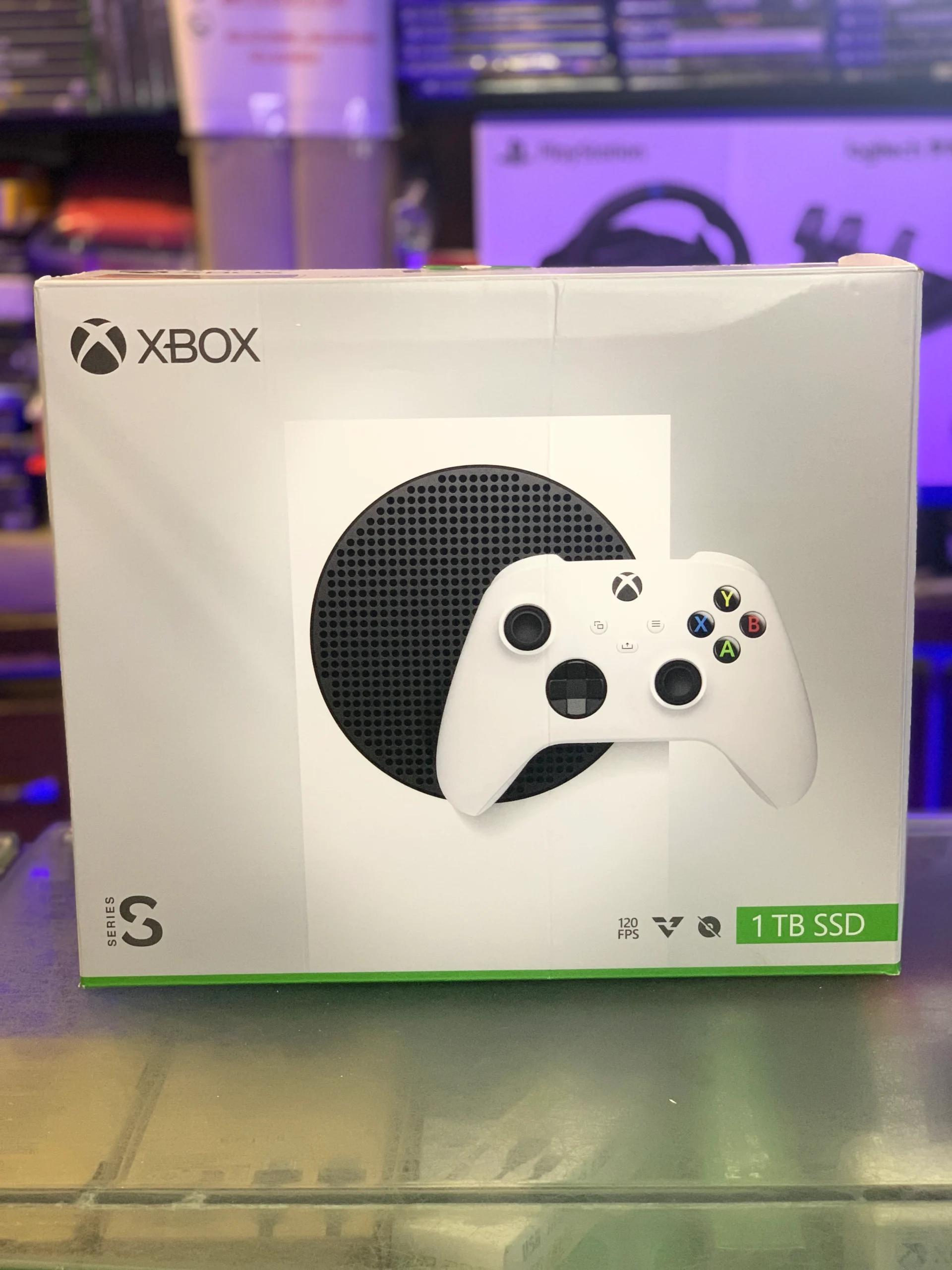
The Xbox Series S 1TB is a compact digital gaming console designed for players who want current-generation Xbox gaming without choosing the larger Series X. The 1TB version addresses one of the main complaints about the original Series S: limited internal storage.
With a larger SSD, the console gives you more room for modern games while keeping the small, lightweight design that makes the Series S easy to fit into a bedroom, living room, or gaming setup. It also supports features such as fast loading, Quick Resume, high frame-rate gaming in supported titles, and access to Xbox Game Pass.
But storage is only one part of the decision. The Series S has important differences from the Series X, including its digital-only design and lower graphics capability. Understanding those trade-offs will help you decide whether the Xbox Series S 1TB fits the way you play.
What Is the Xbox Series S 1TB?
The Xbox Series S 1TB is Microsoft’s higher-storage version of its smaller Xbox Series S console.
Like the standard Series S, it is built around a custom AMD processor and GPU and uses an SSD rather than a traditional mechanical hard drive. The major difference is internal storage capacity.
The console is digital-only, meaning there is no built-in disc drive. Games must therefore be downloaded digitally or accessed through supported subscription and cloud services.
The 1TB SSD is particularly useful because modern games can occupy a substantial amount of storage. Having additional space means you do not have to remove games as frequently when installing new ones.
Xbox Series S 1TB Storage Explained
Storage is arguably the biggest reason to consider the 1TB model.
Although the console is marketed as having 1TB of storage, the space available for installing games and apps is lower than the advertised capacity because some storage is reserved for the system.
That distinction is normal for game consoles. The operating system and system software require part of the SSD.
Still, the 1TB model provides considerably more usable space than the smaller-storage Series S configuration.
Why More Storage Matters
Game sizes vary significantly. Smaller indie games may take relatively little space, while large AAA releases can require many tens of gigabytes.
If you regularly switch between games, a larger SSD can make the experience much more convenient. You can keep a broader selection installed instead of constantly managing your library.
This is especially useful for households where several people use the same console.
Performance and Graphics
The Xbox Series S 1TB uses the same basic performance platform as other Series S models. The extra storage does not turn it into a more powerful console.
Its processor is designed for current-generation Xbox games, while its GPU is less powerful than the one found in the Xbox Series X.
The practical difference is most noticeable in resolution and graphical settings.
The Series S is generally designed around lower rendering resolutions than Series X, although the exact resolution and frame-rate options depend on the individual game. Some supported titles can offer high-refresh-rate gameplay, while others prioritize visual quality.
For someone using a 1080p or 1440p display, this can be a sensible compromise. Players with a large 4K television who want the highest possible graphical settings may prefer the Series X.
Fast Loading and Quick Resume
One of the strongest aspects of the Series S platform is its SSD-based storage.
Compared with older-generation consoles that relied heavily on mechanical hard drives, the SSD allows games and system functions to load much faster.
Xbox’s Quick Resume feature is another useful addition. Supported games can remain suspended so you can switch between compatible titles and return to gameplay without starting completely from the beginning each time.
Quick Resume does have limitations. Not every situation or game behaves identically, particularly when a game requires an online connection.
Key Benefits of the Xbox Series S 1TB
1. More Internal Storage
The 1TB SSD gives you substantially more room for games than the smaller Series S storage configuration.
This reduces the need to repeatedly uninstall and reinstall large games.
2. Compact Design
The Series S is considerably smaller than the Series X. Its compact footprint makes it easy to place on a desk, shelf, or entertainment unit.
For people with limited space, this can be a practical advantage.
3. Current-Generation Xbox Features
You still get access to the modern Xbox ecosystem, including compatible current-generation games, backward-compatible titles, Xbox network features, and Game Pass options.
4. SSD Performance
The solid-state drive contributes to faster loading and supports features such as Quick Resume.
5. Digital Game Library
If you are comfortable purchasing and downloading games digitally, the lack of a disc drive may not be a problem.
Digital ownership also makes it easy to access games from your Xbox library without physically changing discs.
What Are the Limitations?
The Xbox Series S 1TB is not simply a smaller Series X. There are meaningful hardware differences.
No Disc Drive
The biggest limitation for some buyers is the absence of a physical disc drive.
You cannot insert Xbox game discs or Blu-ray discs into the console. If you already own a large collection of physical Xbox games, this should be considered before buying.
Lower Graphics Performance Than Series X
The Series S has a less powerful GPU than the Series X.
As a result, games may use lower resolutions or different graphical settings. Developers also decide which performance modes their games support, so experiences can vary from title to title.
Storage Can Still Fill Quickly
A 1TB SSD is much more useful than a smaller internal drive, but it is not unlimited.
If you maintain a large library of modern AAA games, you can eventually run out of space.
The console supports additional storage solutions, but expanding storage adds to the overall cost.
Who Should Buy the Xbox Series S 1TB?
The 1TB model makes the most sense for gamers who value storage capacity, compact size, and access to the Xbox ecosystem more than maximum graphics performance.
It can be a practical choice for someone who:
- Mostly downloads games digitally
- Uses a 1080p or 1440p display
- Wants a compact console
- Plays through Xbox Game Pass
- Wants more storage than the smaller Series S configuration
- Does not need a physical disc drive
It may be less suitable if your priorities include maximum 4K gaming performance, physical game discs, or the highest graphics settings available on Xbox.
Xbox Series S 1TB vs Series X
The two consoles target somewhat different needs.
| Feature | Xbox Series S 1TB | Xbox Series X |
|---|---|---|
| Storage | 1TB SSD | Varies by model |
| Disc drive | No | Available on applicable models |
| Physical games | No | Yes on disc-drive models |
| GPU performance | Lower | Higher |
| Target gaming experience | Lower-resolution current-gen gaming | Higher-performance gaming |
| Size | Compact | Larger |
| Digital games | Yes | Yes |
| Quick Resume | Yes | Yes |
The important point is that 1TB refers to storage, not performance. Buying the 1TB Series S does not provide the graphics capability of the Series X.
How to Choose the Right Storage
Before buying, think about how many games you normally keep installed.
If you tend to play two or three games at a time, the included SSD may be more than enough. If you regularly maintain a large collection, storage expansion could eventually become useful.
Also consider your internet connection. A faster connection makes large digital downloads much less frustrating, while slower connections make uninstalling and reinstalling games more inconvenient.
For digital-only consoles, storage management becomes part of normal ownership.
Common Buying Mistakes
Assuming 1TB Means 1TB of Game Space
The advertised capacity is not the same as the storage available for your personal content. System software occupies some space.
Expecting Series X Graphics
The larger SSD does not increase the Series S GPU’s performance.
If maximum resolution and graphics quality are your priority, compare the hardware capabilities rather than focusing only on storage.
Forgetting About the Disc Drive
If you buy used physical games, borrow discs from friends, or own an existing disc collection, a digital-only console may not meet your needs.
Ignoring the Total Cost
A lower console price can look attractive until you add games, subscriptions, accessories, or additional storage.
Consider the complete setup rather than judging the console by its purchase price alone.
Tips for Getting the Most From Your Xbox Series S 1TB
Keep only active games installed.
Uninstall games you have finished and reinstall them later when needed.
Use external storage intelligently.
Compatible external drives can be useful for storing games, although storage expansion options differ in how they handle newer optimized titles.
Check individual game requirements.
Don’t assume every game supports the same resolution or frame-rate options.
Consider Game Pass based on your playing habits.
A subscription can provide access to a broad catalog, but its value depends on how often you actually use the included games.
Use the console’s network features.
Automatic updates and remote management can make a digital library easier to maintain.
Is the Xbox Series S 1TB Worth Considering?
The answer depends heavily on what you expect from a console.
The Xbox Series S 1TB combines the compact Series S hardware with significantly more internal storage. That makes it particularly interesting for digital players who want a current-generation Xbox without moving to the larger Series X.
However, its limitations remain important. It does not have a disc drive, and its graphics hardware is less powerful than the Series X.
For many buyers, the decision comes down to three questions: Do you need physical discs? How important is maximum graphics performance? And how much storage do you need?
If you are comfortable with digital gaming and do not require the highest-end Xbox graphics, the 1TB configuration provides a straightforward way to get more storage while retaining the Series S’s compact design.
Frequently Asked Questions
Is the Xbox Series S 1TB better than the original Series S?
The 1TB version primarily improves storage capacity. It does not provide a major performance upgrade over the Series S hardware platform.
Does the Xbox Series S 1TB have a disc drive?
No. The Series S is designed as a digital-only console, so physical game discs cannot be used.
How much storage does the Xbox Series S 1TB have?
It has a 1TB internal SSD, although the amount available for games and personal content is lower because system software uses some of the drive.
Can the Xbox Series S 1TB play Xbox One games?
Yes, the Xbox Series S supports many backward-compatible Xbox One games. Compatibility varies by individual title.
Can the Xbox Series S 1TB play games in 4K?
Some games and media features can support 4K-related output, but the Series S is primarily designed around lower gaming resolutions than the Series X. Actual game resolution depends on the title.
Is 1TB enough for Xbox games?
For many players, 1TB provides a useful amount of space. However, players with large libraries of modern games can still fill the drive.
Can you expand Xbox Series S 1TB storage?
Yes. Xbox supports compatible storage expansion options, although the cost and capabilities of different storage solutions should be considered before purchasing.
Is the Xbox Series S 1TB good for digital gaming?
It is specifically designed around digital gaming. The larger SSD can make a digital library easier to manage, particularly if you regularly keep several large games installed.
Final Thoughts
The Xbox Series S 1TB is best understood as a storage-focused version of Microsoft’s compact current-generation Xbox rather than a smaller version of the Series X.
Its larger SSD solves a practical problem for digital gamers, while the compact design, fast storage, Quick Resume, and access to the Xbox ecosystem remain major parts of the experience. At the same time, the lack of a disc drive and lower graphics performance are factors that should be considered before buying.
For anyone comparing Xbox consoles, the most useful approach is to look beyond storage capacity and consider graphics performance, display resolution, physical versus digital games, storage needs, and total ownership cost together.